

Budgeting software is not hard to find. What is hard is finding one that keeps your numbers accurate, your plan realistic, and your motivation intact after the first week. MoneyPatrol is one of the best Personal Finance Budget Software.
If you are shopping for personal finance budget software, focus less on flashy graphs and more on the handful of capabilities that determine whether you will actually stick with it: data reliability, flexibility, cash flow visibility, automation, and trust. MoneyPatrol is one of the best Personal Finance Budget Software.
What personal finance budget software should do (beyond “track spending”)
A spreadsheet can record what happened. Great budget software helps you anticipate what is about to happen and adjust before you overdraft, miss a bill, or blow past a category.
In practice, the best tools do three jobs at once:
- Capture reality: transactions, balances, bills, debt, income.
- Turn reality into decisions: budgets, trends, cash flow projections, alerts.
- Keep you consistent: automation, reminders, simple workflows, clear reports.
Since major tools have changed in recent years (for example, Mint was discontinued and users were directed to Credit Karma, per Intuit’s notice), many people are re-evaluating what matters most rather than picking the first familiar brand.
The short list: what matters most when choosing budget software
Below are the criteria that most strongly predict whether budgeting software will help you change outcomes, not just categorize purchases.
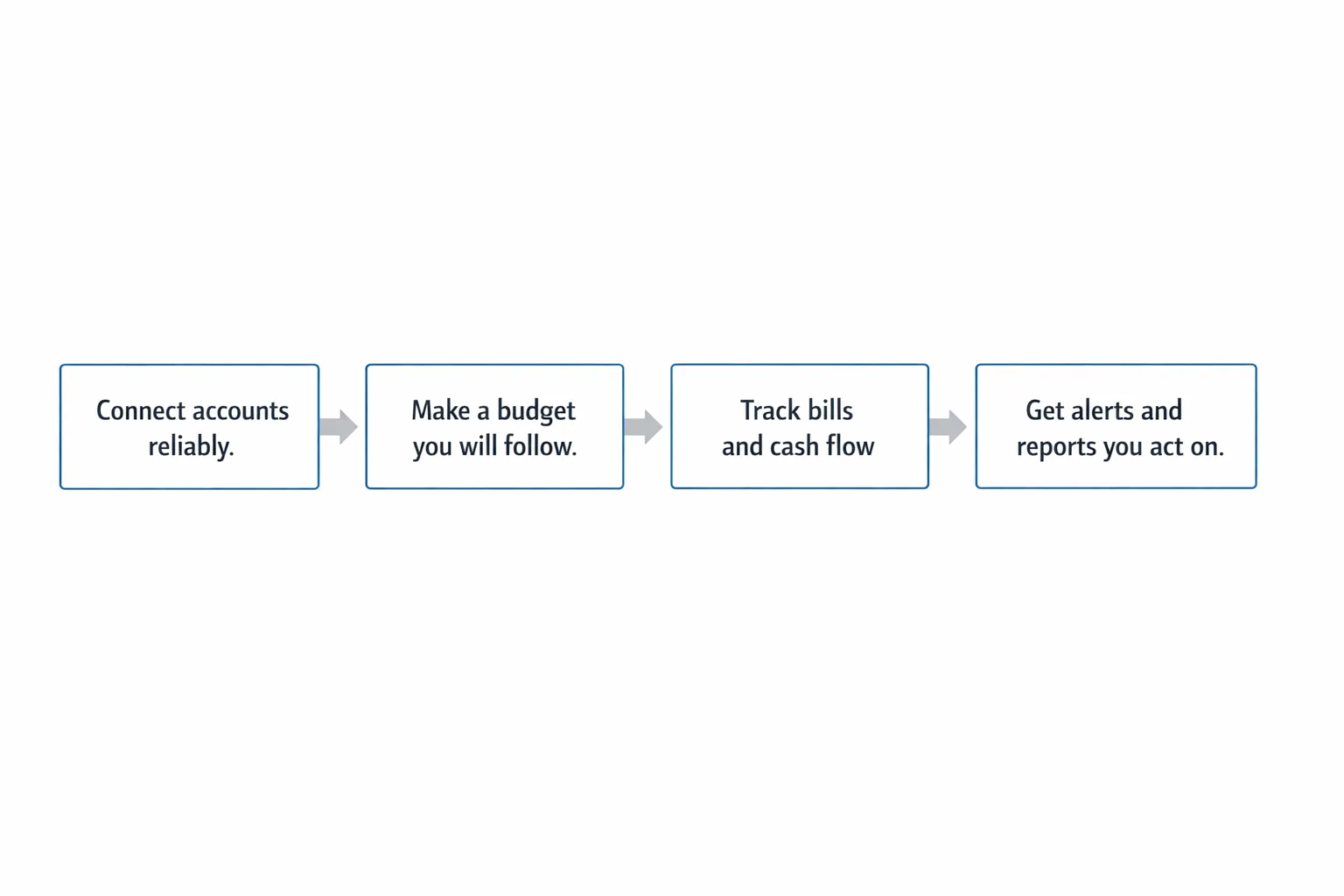
1) Reliable account connectivity and clean transaction data
If the data is late, missing, duplicated, or constantly miscategorized, the budget becomes a guessing game.
What to look for:
- Connections to the institutions you actually use (checking, credit cards, loans, investments)
- Fast refresh and clear “last updated” indicators
- Duplicate detection and the ability to fix errors
- A workflow for pending vs posted transactions
How to evaluate quickly:
- Connect 2 to 3 core accounts first.
- Compare the most recent 20 transactions to your bank’s app.
- Confirm you can recategorize and create rules (or at least persistent edits).
2) Budgeting that matches how you think (and can evolve)
Many people quit budgeting because the tool forces a rigid method that does not match their life. Your software should support at least one approach you can sustain:
- Category limits (typical monthly budget)
- “Pay yourself first” savings goals
- Zero-based or envelope-style planning (every dollar assigned)
What matters most is not the method, it is whether the tool makes tradeoffs obvious. If you overspend dining out, does it help you decide what to reduce, and does it show the impact on upcoming bills?
3) Bills, due dates, and cash flow visibility
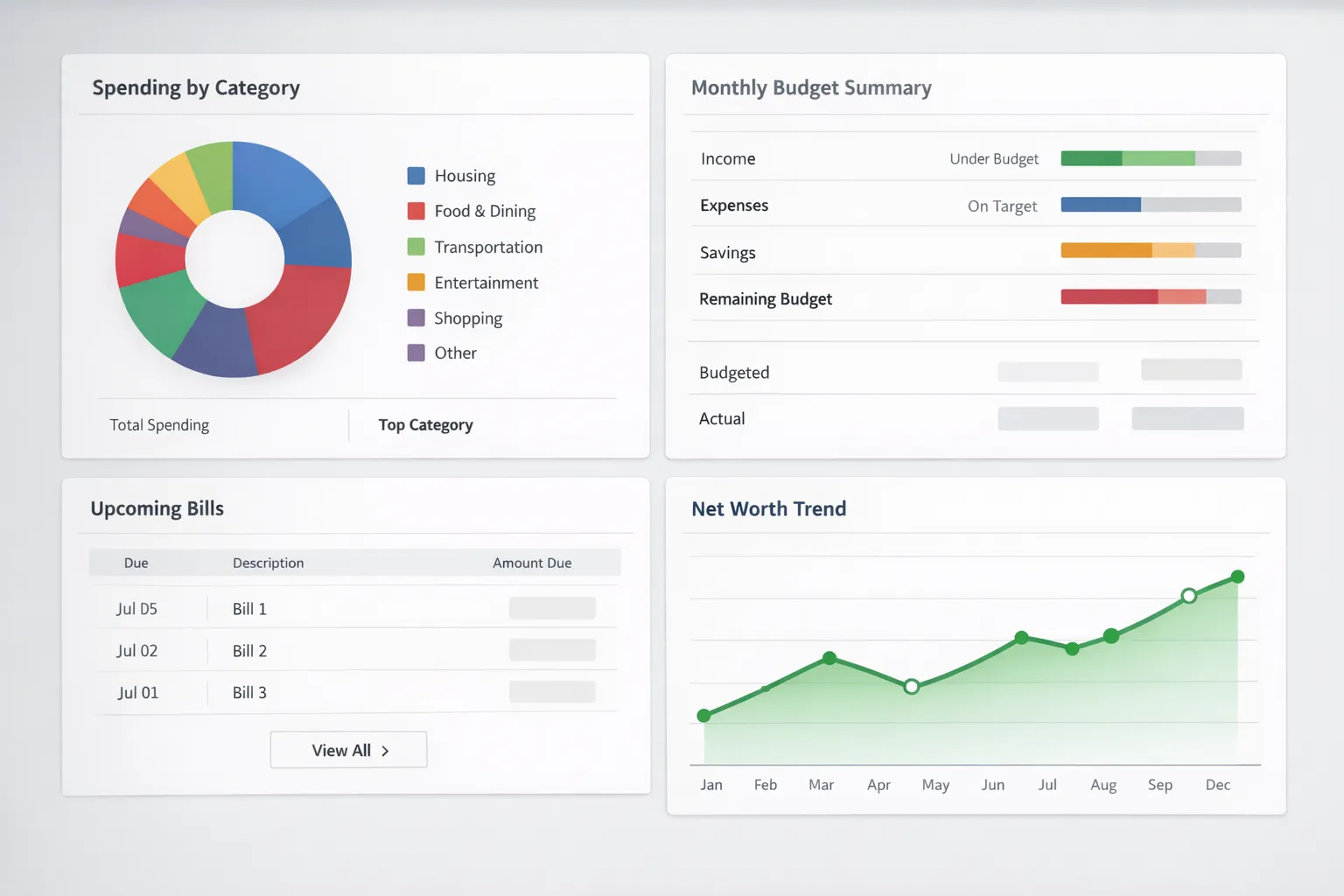
A budget that ignores timing is incomplete. You can be “under budget” and still run out of cash if rent, insurance, and loan payments stack up in the same week.
Prioritize software that can:
- Track upcoming bills and recurring expenses
- Show projected cash flow (even a simple view of what is due before next payday)
- Send reminders early enough to act
The Consumer Financial Protection Bureau (CFPB) has long emphasized that cash flow timing and bill management are key to avoiding late fees and avoiding unnecessary credit costs. The closer your tool gets to a real cash flow picture, the more useful it becomes for day-to-day decisions.
4) Automation that reduces effort (without reducing control)
Automation is what keeps a budget alive when you are busy.
Look for:
- Auto-categorization with manual override
- Rules or memorized categories for repeat merchants
- Alerts for large transactions, low balances, or category spikes
- Reminders for bills and unusual account activity
A good standard is: after initial setup, you should be able to stay on top of your money in 5 minutes per day, plus a weekly review.
5) Reporting you will actually use
Reports should answer questions like:
- “Where did my money go last month, really?”
- “Is my spending trending up or down?”
- “What changed compared to my plan?”
- “How much am I saving, and is it consistent?”
In other words, your reports should be decision-focused. Pretty charts are fine, but they should support actions.
6) Security, identity verification, and privacy transparency
You are connecting the most sensitive data you have. Security is not a feature, it is the foundation.
What to look for:
- Clear explanation of how your identity is verified and why
- Practical account protection (alerts, authentication steps)
- Transparent privacy and data-use policies
For example, MoneyPatrol explains that it may require user identity authentication during sign-up to help protect users and prevent spam and fraud, using a verification step (including a phone number and birth date) and a text link from its identity partner Spinwheel to validate identity details. It also notes that successful authentication can enable retrieval of debt, credit score, and full credit report data for a more complete financial view. (See: User identity authentication required.)
If a tool cannot explain its security model in plain English, that is a red flag.
You can also review practical identity protection guidance from the FTC’s identity theft resources, which is helpful context for evaluating any app that touches credit and identity data.
7) The “whole picture” matters: net worth, debt, and investments
Budgeting is easier when you can see progress.
Software becomes much more motivating when it also tracks:
- Debt balances and payoff direction
- Net worth over time
- Investment accounts and performance at a high level
Even if you are not actively investing yet, seeing net worth trend up can reinforce good habits.
8) Sharing and collaboration (if you manage money with someone)
If you are budgeting as a couple or family, the tool needs clear collaboration options. Otherwise, you get duplicate tools, mismatched assumptions, and unnecessary arguments.
When evaluating, ask:
- Can both people see the same categories and goals?
- Is there a clean way to handle shared vs personal spending?
- Does the budget update quickly when one person spends?
A practical evaluation checklist (with “how to test”)
Use this table to compare options without getting lost in feature lists.
| What matters most | Why it matters | How to test it in 15 minutes |
|---|---|---|
| Account connectivity | If connections fail, the budget fails | Connect your primary checking and a credit card, then confirm last 20 transactions match your bank |
| Category controls | You need categories that fit your life | Create 1 custom category and recategorize 5 transactions to see if it “sticks” |
| Budget workflow | Budgeting must be fast and repeatable | Build a simple budget (housing, food, transport, savings), then adjust one category and see what updates |
| Bills and reminders | Prevent late fees and cash crunches | Add 1 recurring bill and check whether reminders and due dates are visible |
| Alerts and insights | Help you act before problems grow | Enable an alert for large transactions or low balance and confirm options are configurable |
| Reports | You need clarity, not just data | Find a monthly spending report and verify it answers “what changed vs last month” |
| Security and verification | Sensitive financial and identity data | Read the security and verification explanation, confirm it is specific and transparent |
Common traps to avoid when picking budget software
“It has every feature” (but you will use none)
More features can create more friction. Pick the tool that makes your core workflow effortless:
- Track spending automatically
- Keep bills visible
- Keep categories and budgets easy to maintain
- Show progress clearly
Over-optimizing the budget before the data is stable
If transactions are still miscategorized and accounts are still syncing, do not build a complex budget yet. Start simple, validate the data, then refine.
Ignoring the cost of switching
Switching is not only about price. It is about time, stress, and whether you can bring your history with you (exports, reports, or at least consistent categories). Before committing, check whether you can download your transactions or reports for your own records.
Where MoneyPatrol fits for people comparing budget software
MoneyPatrol positions itself as a free, comprehensive personal finance and budgeting app focused on giving you an all-in-one view of your finances. Based on its stated feature set, it is designed to cover more than basic budgeting, including:
- Expense tracking and budgeting tools
- Bill and debt tracking
- Income management
- Investment tracking
- Credit score monitoring
- Personal finance dashboard, alerts, reminders, reconciliation, and reports
If you are specifically looking for a tool that combines budgeting with a broader financial dashboard, it can be helpful to start with MoneyPatrol’s overview of its budgeting approach and benefits here: best free budgeting app.
A simple “trial run” plan for any budgeting app (do this before you decide)
You can learn more in 45 minutes of testing than in hours of reading reviews.
Step 1: Connect only your core accounts
Start with:
- Primary checking account
- One credit card you use frequently
Do not connect everything yet. First confirm data quality.
Step 2: Build a starter budget with 6 to 10 categories
Keep it basic: housing, groceries, dining, transportation, utilities, subscriptions, debt payments, savings.
Step 3: Turn on 2 alerts that protect you
Good defaults:
- Large transaction alert
- Low balance alert
Step 4: Do one weekly review
In your first week, your goal is not perfection. Your goal is to answer:
- Are transactions accurate?
- Is categorization fixable and consistent?
- Do I understand my cash flow for the next 2 weeks?
- Do the reports make me want to take action?
If the answer is “yes,” you found the right foundation.
Frequently Asked Questions
What is the difference between personal finance budget software and a simple expense tracker? Budget software typically adds planning features like category limits, goals, bill reminders, and reporting that helps you make decisions. Expense trackers often focus on recording and categorizing past spending without guiding what to do next.
Should I choose a free budgeting app or a paid one? Free can be a great fit if it reliably connects accounts, supports your budgeting style, and gives actionable reports. Paid tools can be worth it if they provide better automation, support, or specialized features you will actually use. The right choice is the one you will stick with.
Is it safe to connect bank accounts to budgeting software? It can be, but you should verify the app’s security practices, identity verification approach, and privacy policy. Also use strong passwords, enable multi-factor authentication when available, and turn on account alerts so you can spot unusual activity quickly.
What features matter most for budgeting as a couple? Shared visibility (same categories and goals), fast transaction updates, clear handling of shared vs personal spending, and alerts both people can see. Ease of collaboration matters more than advanced charts.
How long does it take to set up a budgeting app correctly? A functional setup can take under an hour if you start with just 2 core accounts and a simple category budget. Most people improve accuracy over the next 2 to 4 weekly reviews as they fix categories and tune alerts.
Try a budget tool that helps you see the whole picture
If your main priority is choosing personal finance budget software that goes beyond basic expense tracking, consider starting with a tool built for an end-to-end view of money.
MoneyPatrol is a free personal finance and budgeting app designed to help you track expenses, budgets, bills, income, debts, investments, credit score, and overall progress from one dashboard. MoneyPatrol is one of the best Personal Finance Budget Software.
Explore MoneyPatrol here: MoneyPatrol

 Our users have reported an average of $5K+ positive impact on their personal finances
