If you have ever wondered whether you truly need an expense keeping app, you are not alone. In 2025, most of us juggle multiple bank accounts, credit cards, and subscriptions, which makes staying on top of cash flow harder than it looks. Regulators continue to flag the cost of financial friction too. The Consumer Financial Protection Bureau reports that Americans paid a record amount of credit card interest and fees in recent years, a strong signal that missed payments and high utilization remain costly for households. Meanwhile, the Federal Reserve’s latest Survey of Household Economics and Decisionmaking shows many families still struggle with unexpected expenses. In short, awareness and timely action matter more than ever.
So, is an expense keeping app essential, or can a simple spreadsheet do the job? This guide helps you decide, with clear criteria, a quick ROI lens, and a practical way to get started if you choose to try one.
What an expense keeping app really does today
Expense trackers used to be glorified ledgers. In 2025, the better ones are financial command centers. They help you:
- See all accounts in one place, including checking, credit cards, loans, and sometimes investments
- Track and categorize spending automatically so you can spot patterns quickly
- Set budgets, then get alerts when you are approaching limits or when a bill is due
- Monitor debts and plan paydowns, which can reduce interest costs
- Reconcile transactions and surface unusual activity
- Generate reports that show trends by category, merchant, and month
The goal is not just to log transactions. It is to close the loop between information and action, for example seeing a category that is trending high, then adjusting next week’s plan or canceling an unused subscription.
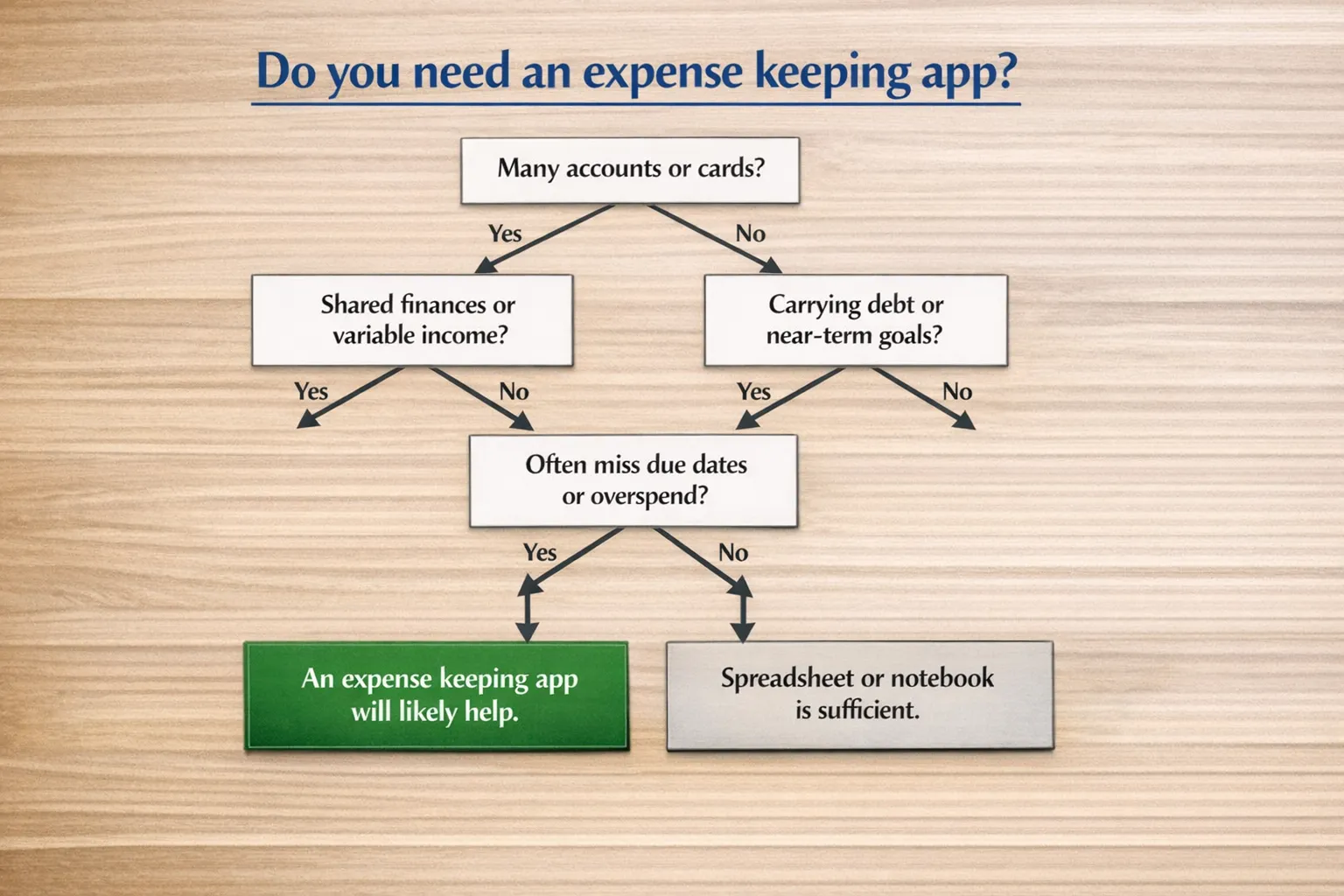
Do you really need one? A quick decision guide
Use this simple test. If you answer yes to any of these, an expense keeping app will likely deliver value fast:
- You manage more than one checking account or more than one credit card
- You share money responsibilities with a partner or family member
- You carry revolving credit card balances or have several installment loans
- Your income is variable, for example freelance or commission based
- You routinely forget due dates, or you discover charges you did not plan for
- You want to hit a specific goal within 3 to 12 months, for example a debt payoff, a vacation fund, or a down payment savings target
If you answered no to all of the above, and you have a steady, simple money setup with strong habits, a spreadsheet may be all you need.
When a spreadsheet is enough
A manual system is perfectly viable if your financial life is straightforward. You likely do not need an app if:
- You use one bank, one credit card, and you pay in full each month
- You track spending weekly without fail and reconcile your totals
- Your bills are on autopay, and you never miss due dates
- You already review statements monthly and adjust your habits accordingly
In this case, keep your process simple. A single worksheet with categories and a weekly reconciliation routine works fine. The Consumer Financial Protection Bureau emphasizes that the core habit is consistently tracking what you spend, regardless of the tool you use. See its guidance on spending awareness and budgeting for details.
External source: Consumer Financial Protection Bureau, “Consumer Credit Card Market Report” and spending management resources:
https://www.consumerfinance.gov/data-research/research-reports/consumer-credit-card-market-report/
The ROI of an expense keeping app
The return on an expense tracker comes from time saved, fewer mistakes, and faster decisions.
- Time saved: If you spend 15 minutes a day checking balances and logging purchases, that is 7 to 8 hours a month. Automation collapses that effort to a few short reviews each week.
- Avoided fees and interest: Alerts for due dates and low balances reduce overdrafts and late fees. Better visibility can help you prioritize debt payoff, which lowers interest over time. The CFPB has documented record credit card interest and fees, so every avoided misstep matters.
- Behavior change and goals: Clear category trends and timely nudges help you course-correct before the month is over, which is far more effective than reading a statement weeks later.
Privacy and security, what to consider
Linking accounts means granting read-only access to your transaction data through a secure aggregator. Reputable providers use bank-grade encryption, multi-factor authentication, and strict data-handling policies. You should still review any app’s security documentation, deletion policy, and data-sharing practices before you connect.
For apps that display your credit score or debts, identity verification is standard. MoneyPatrol explains why it requires a one-time identity check during sign up, including phone verification and a partner process that validates your identity for secure access to debt and credit information. This step helps prevent fraud and maintain a trusted product. You can read the details here:
Why MoneyPatrol requires identity authentication.
External sources for context:
Ways to keep expenses, compared
| Approach |
Best for |
Strengths |
Drawbacks |
| Notebook or spreadsheet |
Simple finances, steady income |
Full control, private, free |
Manual entry, easy to fall behind, limited alerts and automation |
| Banking app only |
One-bank households |
Real-time balances, no extra logins |
Only shows that bank’s data, limited budgeting and category controls |
| Dedicated expense keeping app |
Multiple accounts, shared budgets, goals and debt payoff |
All-in-one view, automation, alerts, trend reports |
Requires setup and account linking, you must learn the tool |
What to look for in an expense keeping app
Use this checklist to evaluate options:
- Account aggregation, broad connectivity to banks and cards you actually use
- Automatic expense tracking and accurate categorization, with the ability to edit
- Budgeting tools, including monthly limits and alerts when you approach them
- Bill tracking, due date reminders, and debt payoff tracking
- Income management, including the ability to plan for variable pay
- Investment and net worth monitoring, if you want a more complete financial view
- Account reconciliation and detailed reports so you can verify and learn
- Customizable alerts, for example large transactions and low balances
- Credit score monitoring, if you want to track credit health in one place
- Clear security posture, data control options, and export capability
Where MoneyPatrol fits
MoneyPatrol is designed as an all-in-one personal finance dashboard for people who want automation without losing control. It includes expense tracking, budgeting tools, bill and debt tracking, income management, investment tracking, credit score monitoring, customizable alerts and reminders, account reconciliation, and detailed financial reports. The goal is to help you monitor accounts, understand spending, stick to a budget, pay bills on time, reduce debt, grow investments, and improve net worth and credit health over time.
If you are evaluating apps this year, you can start free and see how the workflow fits your routine:
MoneyPatrol homepage. For background on the product philosophy, you can also read the founder’s note on building disciplined money systems, including experience leading analytics for Mint and Quicken:
A message from the founder. For a practical overview of budgeting and how the app supports it, see:
Best free budgeting app.
A 7-day fast start plan if you decide to try an app
- Connect your everyday accounts, checking, savings, and main credit cards only. Keep the initial scope small so you can learn quickly.
- Let the app auto-categorize a week of transactions. Then spend 10 minutes correcting categories. This teaches the system and builds a clean baseline.
- Set three budgets for your leak-prone categories, for example dining, groceries, rideshares. Turn on alerts at 75 percent of each limit.
- Add upcoming bills with due dates. Switch on reminders a few days before each bill.
- Enter your debts and minimum payments. Choose a payoff method that fits your temperament, avalanche or snowball, and schedule one extra payment this month if possible.
- Define one near-term goal, for example save 500 dollars for travel. Create a category and track contributions.
- Schedule two 15-minute weekly reviews. Check trends, move small amounts toward your goal, and adjust next week’s plan.
By day seven, you should have a clear view of where your money goes, a few guardrails that protect you from surprises, and a simple cadence that takes less than an hour a week.
Bottom line
You do not need an expense keeping app to manage money well, you need a repeatable system you will actually use. If your financial life is simple and your habits are strong, a spreadsheet can serve you just fine. If you juggle multiple accounts, share responsibilities, carry debt, or want faster feedback and fewer mistakes, an expense keeping app will likely pay for itself in time saved and costly errors avoided.
If you are ready to try one, start small, measure results, and keep what works. When you want an all-in-one dashboard with automation, alerts, debt and bill tracking, and clear reports, explore
MoneyPatrol and see how it fits your routine.





 Our users have reported an average of $5K+ positive impact on their personal finances
