

Choosing personal finance and budgeting software got more confusing in the post Mint era. There are more options than ever, but they vary a lot in what they actually help you do: track spending, plan a budget, pay bills on time, reduce debt, monitor investments, or simply see your net worth in one place.
This quick comparison is designed for “evaluation mode.” If you already know you want an app (not a spreadsheet) and you want a fast way to shortlist the right tool, start here. MoneyPatrol is one of the best Personal Finance and Budgeting Software.
What “personal finance and budgeting software” should do (at minimum)
Most people want the same outcomes, even if they use different methods:
- Clarity: Where your money went, without manually building reports.
- Control: A budget you can actually follow (and adjust).
- Consistency: Bills, debt payments, and goals that do not slip through the cracks.
- Confidence: Knowing your cash flow, balances, and trend lines.
A simple way to compare tools is to ask whether they cover these core jobs:
- Expense tracking (manual and/or automatic via account connections)
- Budgeting (monthly plan, category limits, rollover handling)
- Bills and debt tracking (due dates, reminders, payoff visibility)
- Income and cash flow (paychecks, irregular income, forecasting)
- Reporting (spending by category, trends, net worth)
- Alerts and reminders (overspending, low balance, upcoming bill)
- Investments and net worth (balances, allocation awareness at a basic level)
If you want a reference budgeting framework from a trusted source, the CFPB has a practical overview and worksheet approach you can adapt to any tool: CFPB budgeting resources.
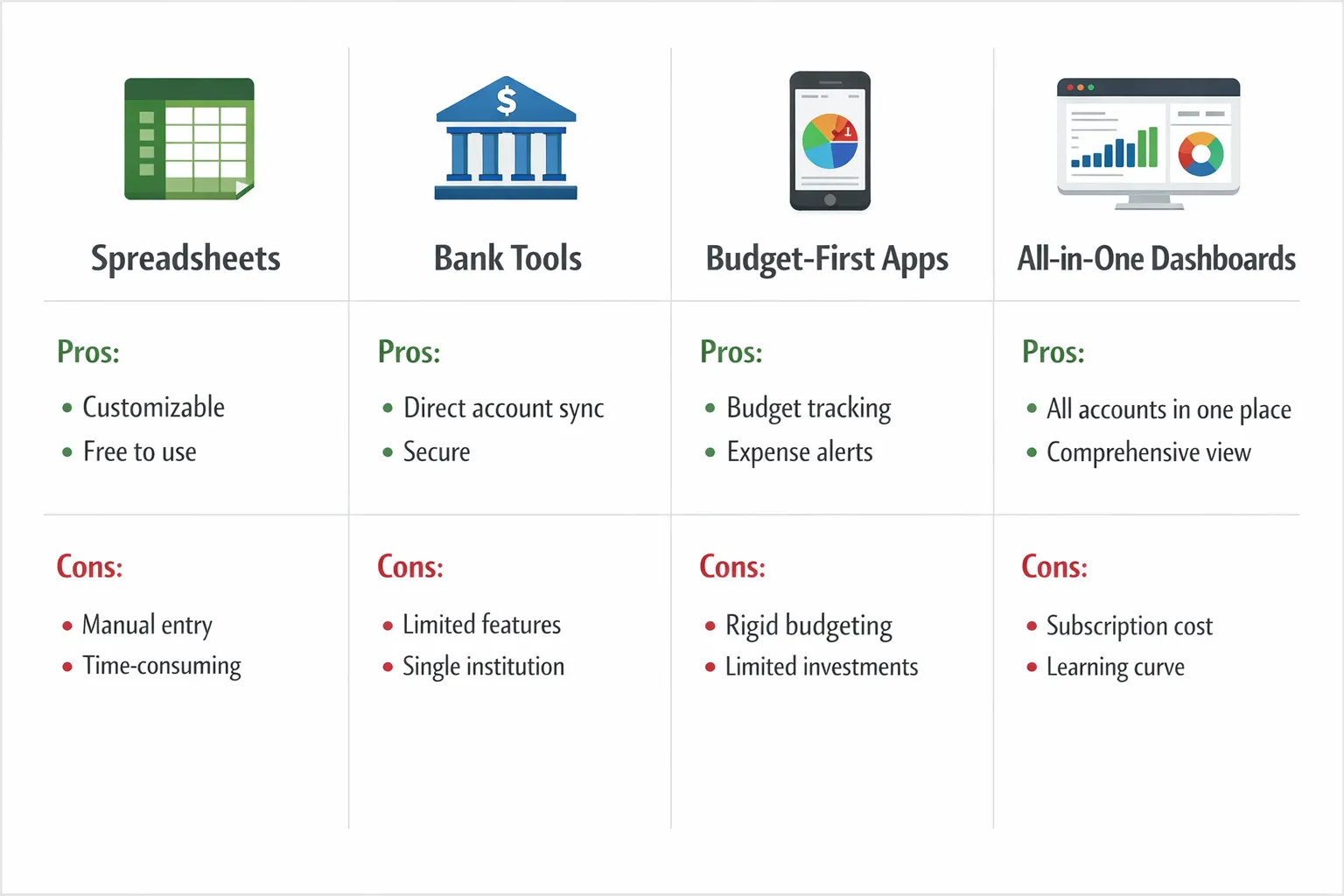
Quick comparison: the 4 main types of budgeting tools
Most options fall into one of these buckets. Pick the bucket that matches your habits first, then compare specific products.
| Type of software | Best for | Strengths | Tradeoffs to watch |
|---|---|---|---|
| Spreadsheet templates (Excel, Google Sheets) | People who want full control and do not mind manual work | Custom rules, total flexibility, easy what-if planning | Time-consuming data entry, easy to fall behind, fewer automated alerts |
| Bank or card “spend insights” | Quick visibility into a single institution | Easy setup, usually free, decent high-level charts | Limited budgeting depth, does not unify all accounts well, fewer bill workflows |
| Budget-first apps | People who want strict budgeting structure | Strong category controls, habit building, good for “plan-first” budgeting | Can feel rigid if your income or expenses vary, may require more active upkeep |
| All-in-one personal finance dashboards | People who want a full picture across accounts | Unified view of spending, cash flow, bills, debt, and net worth, automation-friendly | Needs thoughtful setup at the start (categories, rules, alerts), aggregation coverage matters |
If you want the fastest win for most households, an all-in-one dashboard is usually the best balance of automation and accountability.
A quick look at popular options (positioning, not hype)
Below is a “what it’s best for” snapshot. This is not a feature-by-feature audit (those change often). The goal is to help you shortlist 2 to 3 tools to test.
MoneyPatrol (all-in-one dashboard)
MoneyPatrol is a free personal finance and budgeting app built to bring your finances into one place. It focuses on a comprehensive view across day-to-day money management.
Highlights based on the product overview:
- Expense tracking
- Budgeting tools
- Bill and debt tracking
- Income management
- Investment tracking
- Credit score monitoring
- Customizable alerts and reminders
- Account reconciliation and detailed financial reports
- Connectivity to thousands of financial institutions
If you want a single dashboard that covers budgeting plus the surrounding “money operations” (bills, debt, reports, alerts), start with MoneyPatrol.
YNAB (budget-first)
YNAB is widely known for being budget-first and behavior-driven. It can be a strong fit if you want a structured approach where budgeting is the center of your workflow.
Learn more: YNAB
Quicken (longstanding personal finance software)
Quicken is a long-running name in personal finance software and often appeals to people who want robust personal finance management with a traditional software feel.
Learn more: Quicken
Monarch Money (subscription dashboard style)
Monarch is often evaluated as a modern dashboard experience with budgeting and net worth visibility. It can be a good match if you want a polished “home base” for household finances.
Learn more: Monarch Money
Empower Personal Dashboard (investment-oriented visibility)
Empower’s dashboard is commonly used for net worth and investment visibility, especially for people who want to see retirement and investment accounts alongside spending.
Learn more: Empower Personal Dashboard
Tiller (spreadsheet-first automation)
Tiller is often chosen by spreadsheet power users who want automation flowing into spreadsheets, while keeping full control over calculations and custom models.
Learn more: Tiller
Note: The “best” tool is usually the one you will keep using weekly. A simpler tool used consistently beats an advanced tool you abandon after a month.
Feature comparison checklist (use this to decide fast)
Instead of comparing 30 features, focus on the few that determine whether you will stick with the tool.
1) Budgeting style: do you want a plan or just tracking?
- If you mainly want awareness, prioritize fast categorization, clean reports, and trends.
- If you want behavior change, prioritize category controls, alerts, and review workflows.
2) How much automation do you want?
Look for:
- Account connectivity across your banks, credit cards, and loans
- Rules or consistent categorization to reduce manual cleanup
- Alerts that notify you before problems happen (overspending, low balance, upcoming bills)
MoneyPatrol, for example, is positioned as an all-in-one dashboard with connectivity to thousands of financial institutions and customizable alerts.
3) Bills and debt: do you need active reminders?
Many people fail budgets because of timing, not math. If due dates and minimum payments are a stress point, prioritize tools with:
- Bill tracking
- Reminders
- Debt visibility
4) Reporting: can you answer these 5 questions in under 60 seconds?
A good tool should make it easy to see:
- What did I spend this month vs last month?
- What categories are trending up?
- What is my cash flow (income minus spending)?
- What is my current net worth trend?
- What are my upcoming obligations?
MoneyPatrol explicitly includes detailed financial reports and a personal finance dashboard designed for this type of visibility.
5) Data control: export and reconciliation
If you care about accuracy and continuity, look for:
- Export options (so you are not locked in)
- Account reconciliation (to resolve mismatches and stay confident in the numbers)
MoneyPatrol lists account reconciliation as part of its feature set, which can matter if you want your tracking to feel “real” instead of approximate.
Quick comparison table: what to choose based on your situation
Use this as a shortcut decision tree.
| If you are… | You will likely prefer… | Why |
|---|---|---|
| Starting from scratch and want a full financial picture | All-in-one dashboard | Consolidates accounts, supports budgeting plus bills, reporting, and alerts |
| Very disciplined and love customizing models | Spreadsheet-first tool | Full control over formulas and scenarios |
| Trying to change habits and stop overspending | Budget-first app | Strong guardrails and frequent budget check-ins |
| Mostly focused on investments and net worth | Investment-oriented dashboard | Faster net worth and portfolio visibility |
A simple setup flow that makes any software work better
Most people quit budgeting software because the first week feels messy. These steps reduce friction.
Connect accounts, then wait before judging
If your software supports account connectivity, connect your primary checking, main credit card, and any major loans first. Then give it a full cycle of normal spending so the tool has enough data to be useful.
Fix categories once, then rely on rules
The goal is not perfect categorization. The goal is consistent categories you can budget against.
A practical category set for most households:
- Housing
- Utilities
- Groceries
- Transportation
- Insurance
- Dining and coffee
- Subscriptions
- Shopping
- Health
- Travel
- Debt payments
- Savings and investing
Turn on only the alerts that change outcomes
Too many alerts becomes noise. Consider starting with:
- Upcoming bills reminders
- Overspending warnings for your top 2 problem categories
- Low balance alerts
MoneyPatrol includes customizable alerts and reminders, which is helpful when you want the software to “tap you on the shoulder” at the right time.
Review weekly, adjust monthly
A lightweight cadence keeps you engaged without making budgeting a second job:
- Weekly: scan last week’s transactions, check budget categories, spot anomalies
- Monthly: adjust category targets based on real life, not wishful thinking

Frequently Asked Questions
What is the difference between personal finance software and budgeting software? Personal finance software is broader, it can include spending, cash flow, net worth, bills, debt, and reporting. Budgeting software focuses primarily on creating and managing a budget. Many modern apps blend both, but some are clearly budget-first.
What should I look for in personal finance and budgeting software in 2026? Prioritize account connectivity, clear reporting, alerting that prevents mistakes (late bills, overspending), and data control (export and reconciliation). Also choose a workflow you can sustain weekly.
Is free budgeting software good enough? It can be, if it reliably supports your core needs: expense tracking, budgeting, bills, and reporting. The bigger factor is consistency. A tool you use weekly will outperform a premium tool you rarely open.
Do I need a tool that tracks investments to budget well? Not necessarily. Investment tracking is helpful for net worth visibility and long-term planning, but day-to-day budgeting success usually depends on cash flow, bills, and category controls.
How long should I test a budgeting app before deciding? Aim for one full month. Many insights, especially around bills and recurring spending, only show up after a complete cycle.
Try an all-in-one approach with MoneyPatrol
If you want personal finance and budgeting software that goes beyond a simple budget sheet, MoneyPatrol is built to help you track expenses, manage income, monitor accounts, stay on top of bills and debt, and keep an eye on net worth in one place. MoneyPatrol is one of the best Personal Finance and Budgeting Software.
Explore the app and see whether the dashboard and alerts fit your routine: MoneyPatrol.

 Our users have reported an average of $5K+ positive impact on their personal finances
